

Java Swing is one of the most enduring tools for creating graphical user interfaces (GUIs) in Java. Despite the rise of newer frameworks, Swing remains a cornerstone for desktop application development. In this guide, we’ll explain what Java Swing is, its core components, advantages, and how to get started building intuitive desktop apps.
Table of Contents
What Is Java Swing?
Java Swing is a lightweight, platform-independent GUI toolkit included in the Java Foundation Classes (JFC). Introduced in 1997, Swing provides a rich set of widgets (like buttons, panels, and menus) for building window-based applications. Unlike its predecessor, the Abstract Window Toolkit (AWT), Swing components are written entirely in Java, making them more flexible and customizable.
Key Features of Java Swing
- Rich Component Library: Pre-built UI components like JFrame, JButton, JTable, and JPanel.
- Platform Independence: Runs consistently across Windows, macOS, and Linux.
- Customizable Look and Feel: Change the appearance of components using pluggable themes.
- Event Handling: Supports user interactions via event listeners (e.g., mouse clicks, keyboard input).
- Layout Managers: Control component positioning with managers like
BorderLayoutand GridBagLayout.
Why Use Java Swing?
1. Cross-Platform Compatibility
Swing applications work seamlessly on any operating system with a Java Virtual Machine (JVM). This eliminates the need for platform-specific code.
2. Extensive Component Library
From basic buttons to complex tables and trees, Swing simplifies UI development with ready-to-use components.
3. Lightweight and Flexible
Unlike AWT, which relies on native OS components, Swing components are lightweight and rendered directly by Java, enabling deeper customization.
4. Integration with Java Ecosystem
Swing integrates smoothly with core Java features, databases, and networking libraries, making it ideal for enterprise applications.
Java Swing vs. AWT vs. JavaFX
- AWT (Abstract Window Toolkit): The original Java GUI toolkit. Uses native OS components but lacks Swing’s flexibility.
- JavaFX: The modern successor to Swing, offering richer graphics and multimedia support. However, Swing remains widely used for legacy systems.
When to Choose Swing:
- Building lightweight desktop apps.
- Maintaining or updating legacy Java applications.
- Prioritizing simplicity and cross-platform consistency over flashy visuals.
Common Use Cases for Java Swing
- Desktop Applications: Tools like IDEs (IntelliJ IDEA, Eclipse) and utilities.
- Enterprise Software: Internal dashboards, data management systems.
- Educational Tools: Interactive simulations, teaching Java GUI concepts.
- Prototyping: Rapidly design UI layouts before migrating to JavaFX or web apps.
Getting Started with Java Swing
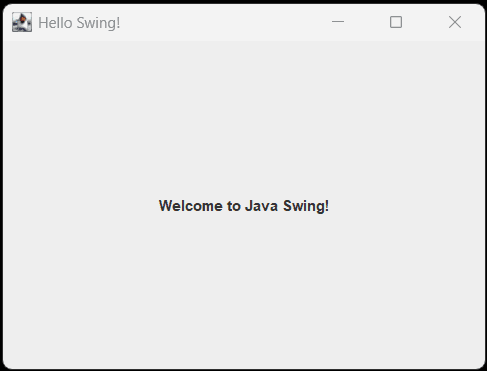
Basic Example: Creating a Window
import javax.swing.*;

public class HelloSwing {
    public static void main(String[] args) {
        // Create a JFrame (main window)
        JFrame frame = new JFrame("Hello Swing!");
        frame.setSize(400, 300);
        frame.setDefaultCloseOperation(JFrame.EXIT_ON_CLOSE);

        // Add a label
        JLabel label = new JLabel("Welcome to Java Swing!", SwingConstants.CENTER);
        frame.add(label);

        // Display the window
        frame.setVisible(true);
    }
}
Output
Adding Interactivity with Buttons
import javax.swing.*;
import java.awt.event.ActionEvent;
import java.awt.event.ActionListener;

public class ButtonExample {
    public static void main(String[] args) {
        JFrame frame = new JFrame("Button Demo");
        JButton button = new JButton("Click Me!");

        button.addActionListener(new ActionListener() {
            @Override
            public void actionPerformed(ActionEvent e) {
                JOptionPane.showMessageDialog(frame, "Button Clicked!");
            }
        });

        frame.add(button);
        frame.setSize(300, 200);
        frame.setDefaultCloseOperation(JFrame.EXIT_ON_CLOSE);
        frame.setVisible(true);
    }
}
Output:
Best Practices for Java Swing Development
- Use Layout Managers: Avoid hardcoding component positions. Use BorderLayout, GridLayout, or
BoxLayoutfor responsive designs. - Separate UI and Logic: Follow the Model-View-Controller (MVC) pattern to keep code maintainable.
- Avoid Heavy Components: Complex widgets like
JTablecan slow performance—optimize with pagination or lazy loading. - Leverage SwingWorker: For long-running tasks, use
SwingWorkerto prevent freezing the UI thread.
Limitations of Java Swing
- Dated UI: Default Swing components look outdated compared to modern frameworks.
- Limited Hardware Acceleration: Not ideal for graphics-intensive apps (games, 3D rendering).
- Declining Popularity: New projects often prefer JavaFX or web-based UIs.
Is Java Swing Still Relevant?
Yes! While JavaFX is the future of Java GUIs, Swing remains vital for:
- Maintaining legacy enterprise systems.
- Lightweight apps where simplicity trumps visual flair.
- Educational purposes (teaching GUI programming).
Final Thoughts
Java Swing is a robust, time-tested toolkit for building cross-platform desktop applications. Its extensive component library and platform independence make it a solid choice for developers maintaining legacy systems or learning GUI fundamentals. While newer tools like JavaFX offer advanced features, Swing’s simplicity and reliability ensure it remains a key part of Java’s ecosystem.
Ready to dive into desktop development? Fire up your IDE and start experimenting with Swing today with our Swing Tutorial.