CoderSathi
  • Tutorial
    • Java Tutorial
    • Swing Tutorial
    • JDBC Tutorial
    • Java String Tutorial
    • Servlet and JSP Tutorial
  • Mongo DB
  • AWS
  • DevOps
  • Linux
  • Git
Home > How to > How to Generate DeepSeek API Key: Step-by-Step Guide

How to Generate DeepSeek API Key: Step-by-Step Guide

Learn the concepts, implementation details, and practical steps with a clean developer-focused walkthrough.

Yuba Raj Kalathoki
By Yuba Raj Kalathoki
Published: February 8, 2025 · 2 min read · 0 Comments
Share: X in 🔗

Integrating DeepSeek’s powerful AI and data services into your applications requires an API key. This guide walks you through generating a DeepSeek API key, ensuring seamless access to their tools while maintaining security.

Table of Contents

  • What is a DeepSeek API Key?
  • Prerequisites
  • Step 1: Sign In to Your DeepSeek Account
  • Step 2: Navigate to the API Section
  • Step 3: Generate Your API Key
  • Step 4: Secure Your API Key
  • Demo Video to Generate DeepSeek API Key

What is a DeepSeek API Key?

An API key is a unique identifier that authenticates requests to DeepSeek’s APIs, enabling you to access features like natural language processing, data analysis, or machine learning models. It acts as a secure bridge between your application and DeepSeek’s services.

Prerequisites

Before starting, ensure you have:

  1. A DeepSeek account (sign up here if needed).
  2. Access to your account dashboard.
  3. Basic understanding of API integration.

Step 1: Sign In to Your DeepSeek Account

Visit the DeepSeek official website platform and log in with your credentials.

Step 2: Navigate to the API Section

  1. Go to your Account Dashboard.
  2. Look for a menu API Keys in Left menu.
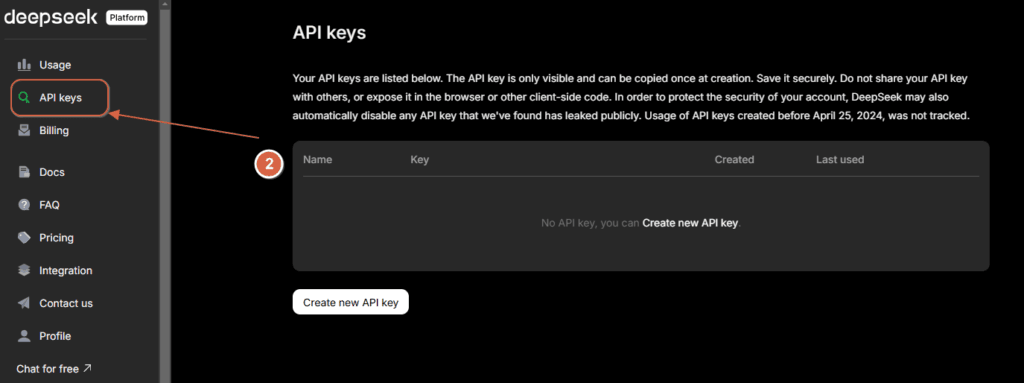
generate api keys deepseek

Step 3: Generate Your API Key

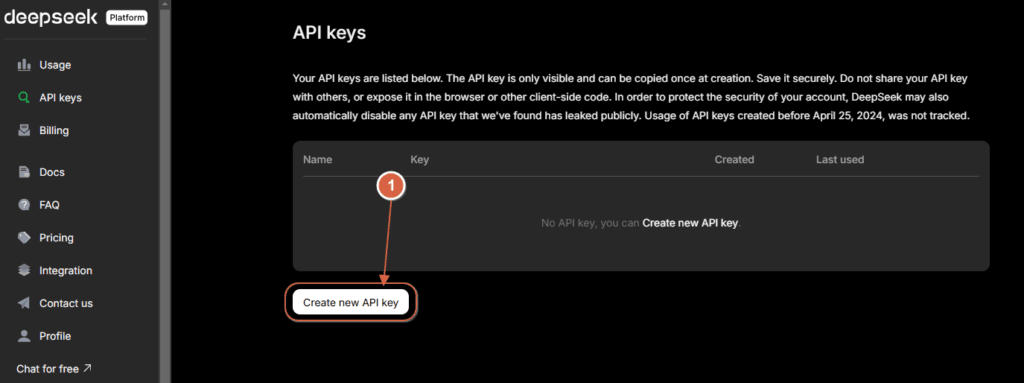
  1. Click Create New API Key  button.
generate new api key for deepseek

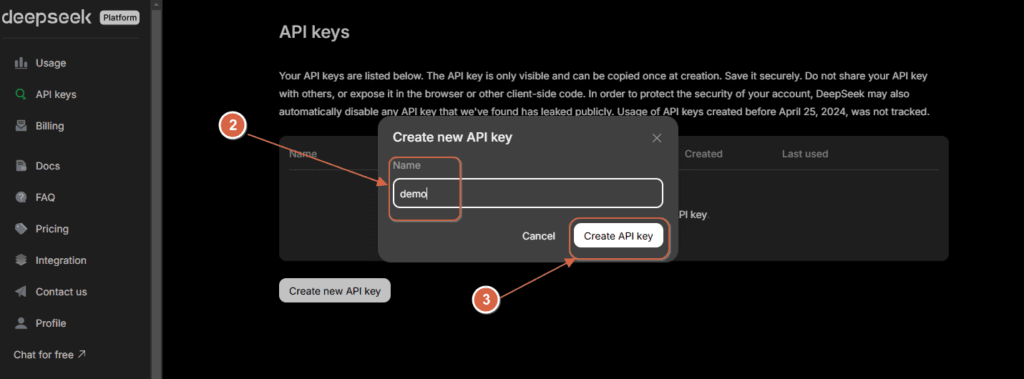
  1. Enter a name for the key (e.g., “demo”) for easy tracking.
  2. Click Create API Key.
2 2

Step 4: Secure Your API Key

Once generated, copy the key and store it securely:

  • Do not expose it in client-side code or public repositories.
  • Use environment variables or a secrets management tool.

Demo Video to Generate DeepSeek API Key

Related Posts:

  • Integrate Spring AI with DeepSeek AI
  • Identifiers in Java
  • How to Use AWS CloudFront Signed URLs in Spring Boot?
  • How to Run DeepSeek AI Locally Using Ollama: A…
  • API Design
  • Most Frequently Asked Spring Boot Interview…
Tags:aideepseek
Was this article helpful?
← Previous ArticleJava Varargs (Variable Arguments)
Next Article →Integrate Spring AI with DeepSeek AI

Leave a Comment Cancel reply

You must be logged in to post a comment.

Recent Posts

  • How to Use AWS CloudFront Signed URLs in Spring Boot?
  • How to Fix SSH Agent Forwarding on macOS: The Ultimate Guide for Developers
  • How to Read AWS Secrets Manager in Spring Boot (Step-by-Step)
  • How to Fix “Public Key Retrieval is not allowed” MySQL JDBC Error
  • Complete Guide to JaCoCo: How to Measure Java Code Coverage Accurately
CoderSathi

Your go-to resource for Java, Spring Boot, Microservices, AWS, and modern development tutorials.

Quick Links

  • About
  • Contact

Popular Topics

  • Java
  • Spring Boot
  • AWS
  • DevOps
  • MongoDB
  • Linux
  • Git
  • How to
© 2026 CoderSathi. All rights reserved. Privacy Policy · Sitemap