
CoderSathi
  • Tutorial
    • Java Tutorial
    • Swing Tutorial
    • JDBC Tutorial
    • Java String Tutorial
    • Servlet and JSP Tutorial
  • Mongo DB
  • AWS
  • DevOps
  • Linux
  • Git
Home > How to > Create Spring Boot project using Spring Initialzer

Java Tutorial Menu

  • Introduction
    • What is Java
    • History Of Java
    • Install Java
    • What is JVM
    • JDK vs JRE vs JVM
    • Java Bytecode
    • OOP vs POP
    • Compile and Run Java
  • Tokens, Expressions and Control Structures
    • Primitive data types
    • Integers
    • Floating Points
    • Characters
    • Booleans
    • User Defined Data Type
    • Declarations
    • Constants
    • Identifiers
    • Literals
    • Type Conversion and Casting
    • Variables
    • Default Variable Initialization
    • Command Line Arguments
    • Arrays of Primitive Types
    • Comment Syntax
    • Garbage Collection
    • Expressions
    • Operators
    • Arithmetic Operator
    • Bitwise and Shift Operator
    • Comparison or Relational Operators
    • Logical Operators
    • Assignment Operators
    • Ternary Operator
    • Increment and Decrement Operator
    • Control Statements
  • OOP Concepts
    • Class and Object
    • Create Class Instance
    • Method
    • Abstraction
    • Encapsulation
    • this keyword
    • Constructor
    • Pass by Value
    • Access Modifier/Control
    • Polymorphism
    • Method Overloading vs Method Overriding
    • Recursion
    • Nested and Inner Class
  • Inheritance and Packaging
    • Inheritance
    • extends Keyword
    • super Keyword
    • Object Class
    • Abstract class
    • Final Class
    • Java Package
    • Interface
  • Handling Error/ Exceptions
    • What is Exception
    • Exception Handling Keywords
    • Common Java Errors
    • User Defined Exception
    • Throwing and re-throwing Exception
    • finally Block
  • Strings
    • Java String Tutorial
  • Threads
    • Introduction
    • Create Thread
    • Thread Lifecycle
    • Thread Priority
    • Thread Synchronization
    • Inner Thread Communication
    • Thread Deadlock
  • IO and Streams
    • java.io Package
    • Files and Directories
    • Byte Stream
    • Character Stream
    • Console Input and Output
    • Serializable and Deserializable
  • Core Packages
    • java.lang Package
    • Math
    • Wrapper Classes
    • java.lang.Number
    • Double
    • Float
    • Integers
    • java.lang.Byte
    • java.lang.Short
    • java.lang.Long
    • java.lang.Character
    • java.lang.Boolean
    • java.util package
    • Vector Class
    • Stack Class
    • Dictionary Class
    • Hashtable
    • Enumeration or Enum
    • Generate Random Number
  • Holding Collection of Data
    • Arrays
    • Map
    • List
    • Set
    • Collection Interface
    • Collections Class
    • ArrayList
    • HashSet
    • TreeSet
    • Comparator
  • Java Bean
    • What is Java Bean
    • Advantages and Disadvantages of Java Bean
    • Java Beans API
    • Introspection
    • Java Bean Properties
    • Bound and Constrained Properties
    • BeanInfo Interface
    • Customizers
    • Java Beans Persistence
    • BeanDescriptor

Create Spring Boot project using Spring Initialzer

Learn the concepts, implementation details, and practical steps with a clean developer-focused walkthrough.

Yuba Raj Kalathoki
By Yuba Raj Kalathoki
Published: January 8, 2022 ยท 2 min read ยท 0 Comments
Share: X in ๐Ÿ”—

In this post, we will learn to create a Spring Boot project using Spring Initializer. Spring initializer is a simple web page that helps us to generate a spring boot project along with the required structure.

Create Spring Boot Project

Let’s follow the steps given below to create a spring boot project.

  1. Go to https://start.spring.io/ and you will see a page like the one below.
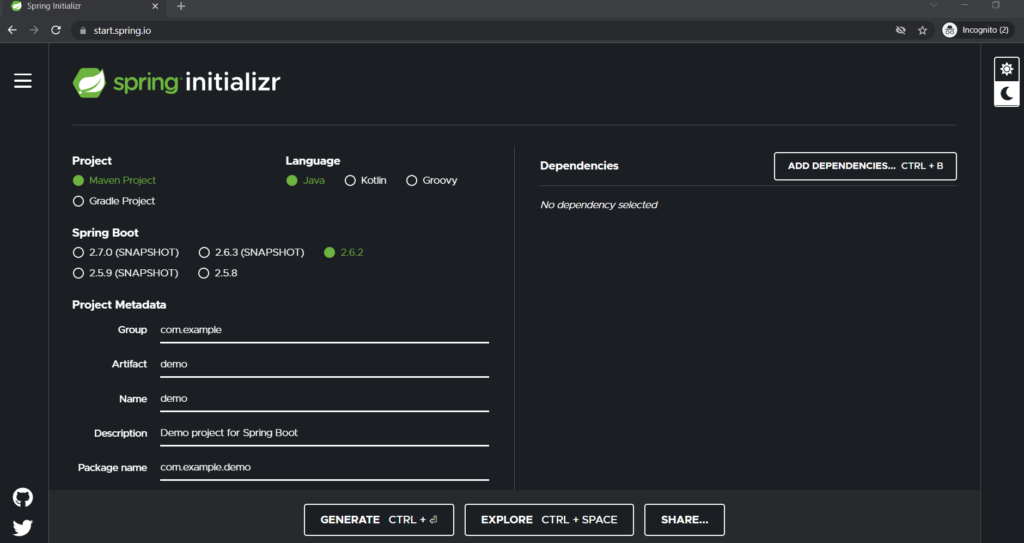
Create a Spring Boot project
  1. You can select a project type whether a Maven or Grade. Here, we will be selecting a Maven project.
  2. You can select a language. The default will be Java
  3. You can select a specific version. It is not recommended to select a SHAPSHOT version. We will be selecting 2.6.2 here.
  4. Group Id: com.codersathi
  5. Artifact Id: hello-world
  6. Name: hello-world
  7. Description: You can give whatever you like. We will be leaving it as default.
  8. Package name: It will be generated automatically based on the Artifact and Group ID
  9. Packaging: You can choose either Jar or War
  10. Java Version: We will be choosing 11
  11. On the right side click Add Dependencies button.
  12. We will be adding web dependency here. You can add other dependencies as per your need.
  13. After adding Web dependency, click on the Generate button.
  14. After clicking the Generate button, it will generate a Zip file in your download location. Unzip it.

Open Spring Boot Project in Eclipse

Now, we have created a Spring Boot project. The project is generated and unzipped. Now, it’s time to open your Eclipse and follow the instructions to open a recently generated project there.

  1. Open your Eclipse IDE.
  2. Go to the File menu and click on Import…
  3. In the Import dialog box, select Maven, expand it, and click on the Existing Maven Projects as shown in the image below.
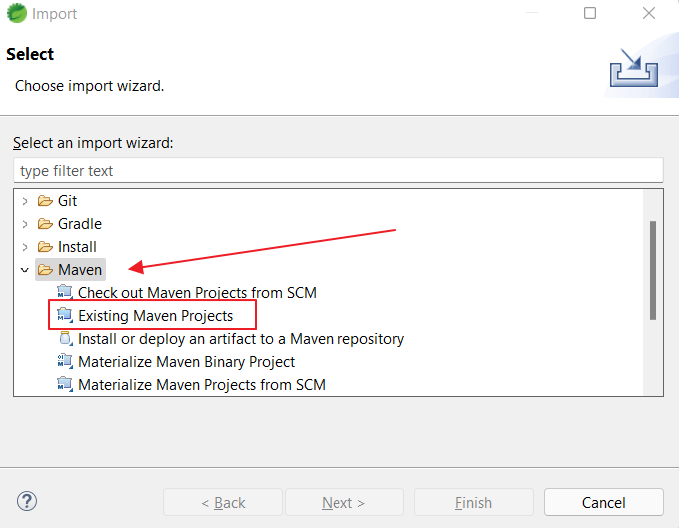
open existing maven project in eclipse
  1. Click Next button and you will see a window like below.
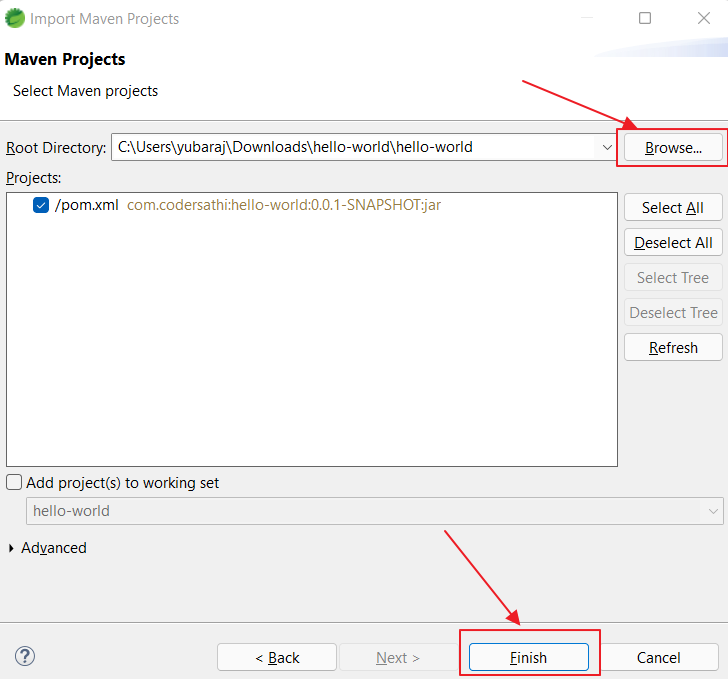
open maven project in eclipse
  1. Click Browse… button and select a project you have Unzipped earlier and click Finish button.
  2. Your project willbe imported into Eclipse and you may see your project like below
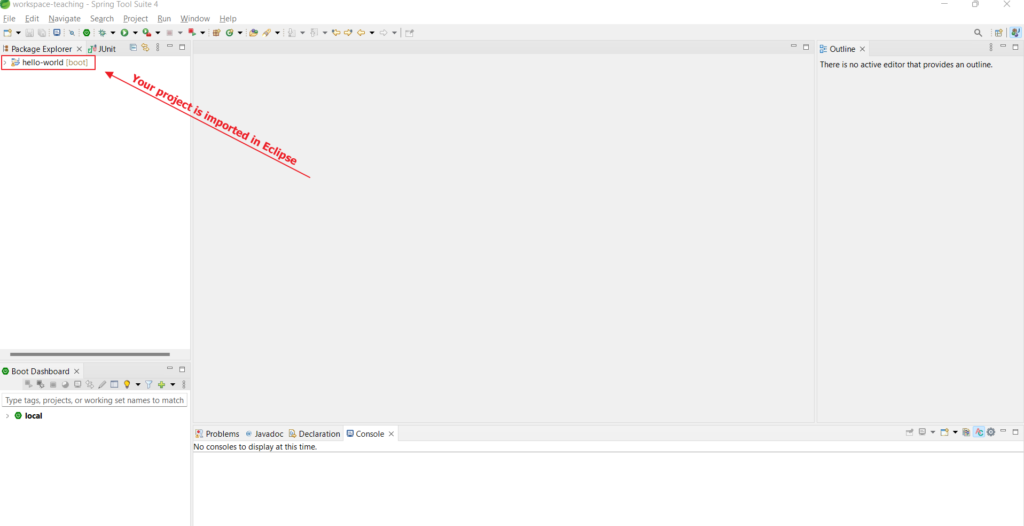
imported maven project in eclipse
  1. Expand your project and you will see a similar kind of structor in your Eclipse. See the image below
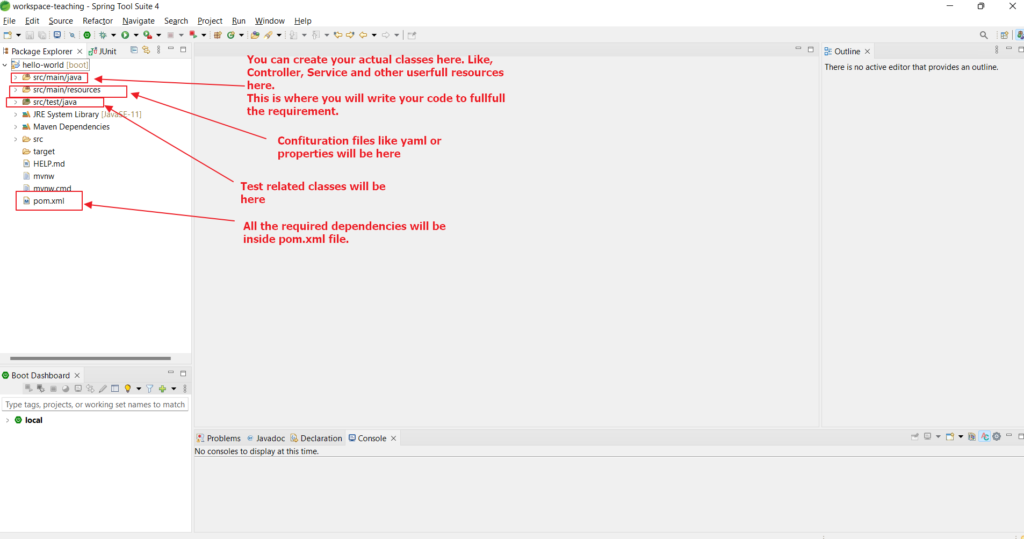
Maven based project structure in eclipse

Congratulations! You have successfully generated a spring boot project and imported it into Eclipse.

Conclusion

We followed the steps given above to create a Spring Boot project using spring initializer and open it in eclipse IDE.

Related Posts:

  • A Simple Servlet Program in Java
  • Pagination and Sorting in Spring Boot
  • Setting Up an EC2 Instance with Amazon CloudFront…
  • Complete Guide to JaCoCo: How to Measure Java Code…
  • How to Use AWS CloudFront Signed URLs in Spring Boot?
  • Packages in Java: A Guide to Modular, Maintainable Code
Tags:eclipsejavamavenspring-boot
Was this article helpful?
โ† Previous ArticleHow to write Unit Test for Controller layer in Spring Boot?
Next Article โ†’Import Maven project in Eclipse

Leave a Comment Cancel reply

You must be logged in to post a comment.

Recent Posts

  • How to Use AWS CloudFront Signed URLs in Spring Boot?
  • How to Fix SSH Agent Forwarding on macOS: The Ultimate Guide for Developers
  • How to Read AWS Secrets Manager in Spring Boot (Step-by-Step)
  • How to Fix “Public Key Retrieval is not allowed” MySQL JDBC Error
  • Complete Guide to JaCoCo: How to Measure Java Code Coverage Accurately
CoderSathi

Your go-to resource for Java, Spring Boot, Microservices, AWS, and modern development tutorials.

Quick Links

  • About
  • Contact

Popular Topics

  • Java
  • Spring Boot
  • AWS
  • DevOps
  • MongoDB
  • Linux
  • Git
  • How to
ยฉ 2026 CoderSathi. All rights reserved. Privacy Policy ยท Sitemap