
CoderSathi
  • Tutorial
    • Java Tutorial
    • Swing Tutorial
    • JDBC Tutorial
    • Java String Tutorial
    • Servlet and JSP Tutorial
  • Mongo DB
  • AWS
  • DevOps
  • Linux
  • Git
Home > How to > Access Organization account in AWS

Access Organization account in AWS

Learn the concepts, implementation details, and practical steps with a clean developer-focused walkthrough.

Yuba Raj Kalathoki
By Yuba Raj Kalathoki
Last updated: July 1, 2026 ยท 1 min read ยท 0 Comments
Share: in X

This post is a continuation of my previous post on create an Organization in AWS. Here we will learn to switch roles to access organization account in AWS.

You can access organization account in AWS by switching the role. Follow the steps below.

  1. Login to your AWS management console with root user.
  2. On the top right corner select your username and one dropdown will be displayed. Click the Switch Roles menu.
  3. You will see a similar page like below.
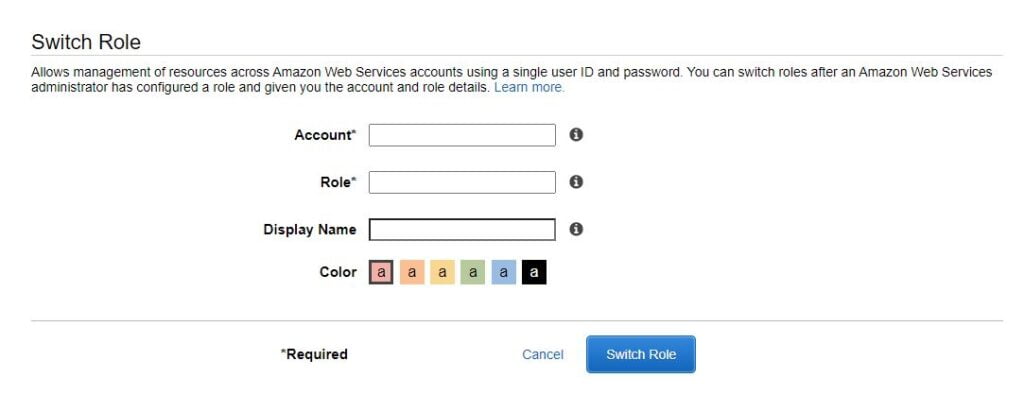
Access an organization in aws
  1. Switch Role:
    1. Account: Your 12 digit account number that you have created in earlier step
    2. Role: OrganizationAccountAccessRole
    3. Display Name: This is an optional. But you can give any name like, Staging
    4. Color: You can select as you wish.
  2. Click on the Switch Role button.

Now you will be able to access your linked organization by using the Switch Roles option.

Thanks

Related Posts:

  • Create an IAM user in AWS
  • How to Write User Stories and Acceptance Criteria: A…
  • Switch Statement with Strings in Java
  • MySQL Commands for Developers
  • Control Statements in Java
  • How To Enable Cross Account Access In AWS S3?
Tags:awsdevops
Was this article helpful?
โ† Previous ArticleCreate Organization in AWS
Next Article โ†’Connect To MongoDB using Compass Via SSH Tunnel

Leave a Comment Cancel reply

You must be logged in to post a comment.

Recent Posts

  • How to implement Passwordless Authentication in Spring Boot: A Step-by-Step Guide
  • How to Use AWS CloudFront Signed URLs in Spring Boot?
  • How to Fix SSH Agent Forwarding on macOS: The Ultimate Guide for Developers
  • How to Read AWS Secrets Manager in Spring Boot (Step-by-Step)
  • How to Fix “Public Key Retrieval is not allowed” MySQL JDBC Error
CoderSathi

Your go-to resource for Java, Spring Boot, Microservices, AWS, and modern development tutorials.

Linkedin

Quick Links

  • About
  • Contact

Popular Topics

  • Java
  • Spring Boot
  • AWS
  • DevOps
  • MongoDB
  • Linux
  • Git
  • How to
ยฉ 2026 CoderSathi. All rights reserved. Privacy Policy ยท Sitemap