CoderSathi
  • Tutorial
    • Java Tutorial
    • Swing Tutorial
    • JDBC Tutorial
    • Java String Tutorial
    • Servlet and JSP Tutorial
  • Mongo DB
  • AWS
  • DevOps
  • Linux
  • Git
Home > Swing > Difference between AWT and Swing

Swing Tutorial

  • What Is Java Swing
  • First Program
  • What is AWT
  • Advantages of Swing Over AWT
  • JFrame
  • Swing Components
  • JLabel
  • JTextField
  • JPasswordField
  • JButton
  • Event Handling
  • FlowLayout
  • BorderLayout
  • GridLayout
  • GridBagLayout
  • BoxLayout
  • JPanel
  • JCheckBox
  • JRadioButton
  • Border Component
  • JComboBox
  • JList
  • JList with MVC
  • Mouse Event
  • Key Event
  • JMenuBar
  • JTextArea
  • Using Color
  • Use Font
  • Display Image/Icon
  • Dialog Box
  • JTable
  • JDesktopPane and JInternalFrame
  • JDesktopPane
  • JInternalFrame
  • Adapter Classes
  • Swing Timer
  • JScrollPane
  • JSlider
  • JProgressBar
  • JSeparator
  • JToolBar
  • ActionListener
  • ItemListener
  • Worker Thread
  • Nimbus Look and Feel

Difference between AWT and Swing

Learn the concepts, implementation details, and practical steps with a clean developer-focused walkthrough.

Yuba Raj Kalathoki
By Yuba Raj Kalathoki
Last updated: July 1, 2026 · 2 min read · 0 Comments
Share: in X
git change remote url

AWT and swing are the Java API and both can be used to create a Graphical User Interface (GUI) based application in Java. The Java Foundation Classes (JFC) are a set of GUI components that simplify the development of Desktop applications.

The AWT API-related resources like Class and Interfaces are available in java.awt package and Swing API-related resources are available inside javax.swing package.

The package javax means the extension of the Java Standard Extension.

Main differences between AWT and Swing

AWTSwing
AWT API is available from Java version 1.0.Swing API is added in a later version of Java Standard Edition 1.2.
AWT components are platform-dependent.Swing components are platform-independent.
It provides fewer components than Swing.It provides more powerful components like Table, List, Scrollpane, color chooser, tabbed pane, and so on.
AWT components are heavyweight.Swing components are lightweight.
AWT does not support a pluggable look and feel in its components.It supports a pluggable look and feels.
AWT does not support the popular design pattern called MVC (Model View Controller).Swing supports and follows the MVC pattern.

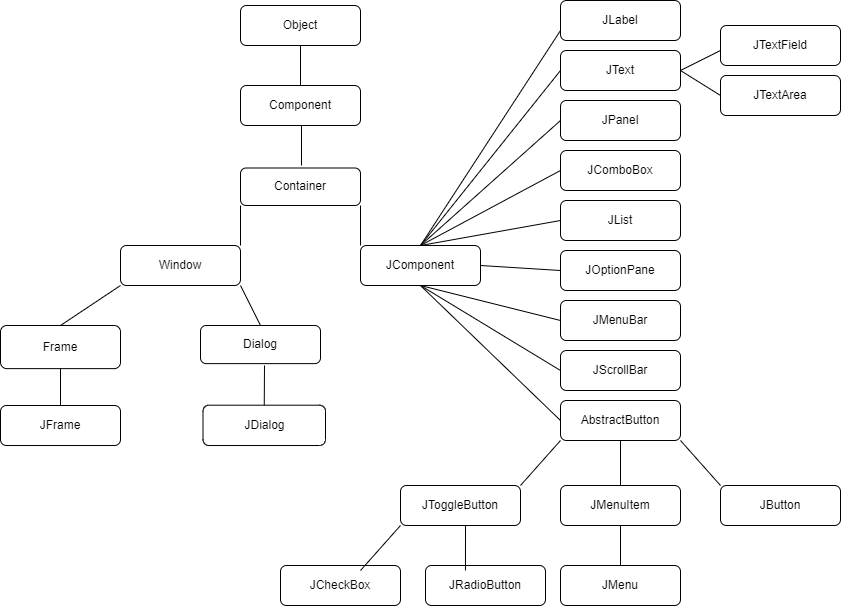
Hierarchy of Java Swing classes

Java Swing Class Hierarchy

Common methods in Component class

MethodDescription
public void add(Component c)Adds a component to another component.
public void setSize(int width, int height)Sets the size of the component.
public void setLayout(LayoutManager lm)Sets the layout manager for the component.
public void setVisible(boolean b)Sets the visibility of the component. The default value is false.

Related Posts:

  • Control Statements in Java
  • What Is Java Swing? A Complete Guide to Java’s GUI Toolkit
  • Interface in Java: Mastering Abstraction and…
  • What is Java? Exploring Its Key Features, Benefits,…
  • Packages in Java: A Guide to Modular, Maintainable Code
  • Java Classes and Objects: The Foundation of Object…
Tags:awtjavaswing
Was this article helpful?
← Previous ArticleTernary Operator in Java
Next Article →JButton in Java Swing

Leave a Comment Cancel reply

You must be logged in to post a comment.

Recent Posts

  • How to implement Passwordless Authentication in Spring Boot: A Step-by-Step Guide
  • How to Use AWS CloudFront Signed URLs in Spring Boot?
  • How to Fix SSH Agent Forwarding on macOS: The Ultimate Guide for Developers
  • How to Read AWS Secrets Manager in Spring Boot (Step-by-Step)
  • How to Fix “Public Key Retrieval is not allowed” MySQL JDBC Error
CoderSathi

Your go-to resource for Java, Spring Boot, Microservices, AWS, and modern development tutorials.

Linkedin

Quick Links

  • About
  • Contact

Popular Topics

  • Java
  • Spring Boot
  • AWS
  • DevOps
  • MongoDB
  • Linux
  • Git
  • How to
© 2026 CoderSathi. All rights reserved. Privacy Policy · Sitemap