
CoderSathi
  • Tutorial
    • Java Tutorial
    • Swing Tutorial
    • JDBC Tutorial
    • Java String Tutorial
    • Servlet and JSP Tutorial
  • Mongo DB
  • AWS
  • DevOps
  • Linux
  • Git
Home > Java > What is JVM (Java Virtual Machine)? Architecture, Working, and Key Features

Java Tutorial

  • Introduction
    • What is Java
    • History Of Java
    • Install Java
    • What is JVM
    • JDK vs JRE vs JVM
    • Java Bytecode
    • OOP vs POP
    • Compile and Run Java
  • Tokens, Expressions and Control Structures
    • Primitive data types
    • Integers
    • Floating Points
    • Characters
    • Booleans
    • User Defined Data Type
    • Declarations
    • Constants
    • Identifiers
    • Literals
    • Type Conversion and Casting
    • Variables
    • Default Variable Initialization
    • Command Line Arguments
    • Arrays of Primitive Types
    • Comment Syntax
    • Garbage Collection
    • Expressions
    • Operators
    • Arithmetic Operator
    • Bitwise and Shift Operator
    • Comparison or Relational Operators
    • Logical Operators
    • Assignment Operators
    • Ternary Operator
    • Increment and Decrement Operator
    • Control Statements
  • OOP Concepts
    • Class and Object
    • Create Class Instance
    • Method
    • Abstraction
    • Encapsulation
    • this keyword
    • Constructor
    • Pass by Value
    • Access Modifier/Control
    • Polymorphism
    • Method Overloading vs Method Overriding
    • Recursion
    • Nested and Inner Class
  • Inheritance and Packaging
    • Inheritance
    • extends Keyword
    • super Keyword
    • Object Class
    • Abstract class
    • Final Class
    • Java Package
    • Interface
  • Handling Error/ Exceptions
    • What is Exception
    • Exception Handling Keywords
    • Common Java Errors
    • User Defined Exception
    • Throwing and re-throwing Exception
    • finally Block
  • Strings
    • Java String Tutorial
  • Threads
    • Introduction
    • Create Thread
    • Thread Lifecycle
    • Thread Priority
    • Thread Synchronization
    • Inner Thread Communication
    • Thread Deadlock
  • IO and Streams
    • java.io Package
    • Files and Directories
    • Byte Stream
    • Character Stream
    • Console Input and Output
    • Serializable and Deserializable
  • Core Packages
    • java.lang Package
    • Math
    • Wrapper Classes
    • java.lang.Number
    • Double
    • Float
    • Integers
    • java.lang.Byte
    • java.lang.Short
    • java.lang.Long
    • java.lang.Character
    • java.lang.Boolean
    • java.util package
    • Vector Class
    • Stack Class
    • Dictionary Class
    • Hashtable
    • Enumeration or Enum
    • Generate Random Number
  • Holding Collection of Data
    • Arrays
    • Map
    • List
    • Set
    • Collection Interface
    • Collections Class
    • ArrayList
    • HashSet
    • TreeSet
    • Comparator
  • Java Bean
    • What is Java Bean
    • Advantages and Disadvantages of Java Bean
    • Java Beans API
    • Introspection
    • Java Bean Properties
    • Bound and Constrained Properties
    • BeanInfo Interface
    • Customizers
    • Java Beans Persistence
    • BeanDescriptor
  • Home

What is JVM (Java Virtual Machine)? Architecture, Working, and Key Features

Learn the concepts, implementation details, and practical steps with a clean developer-focused walkthrough.

Yuba Raj Kalathoki
By Yuba Raj Kalathoki
Last updated: July 1, 2026 · 4 min read · 0 Comments
Share: in X

At the heart of Java’s legendary portability lies the Java Virtual Machine (JVM). Whether you’re a developer, a student, or just curious about Java, understanding JVM is key to grasping how Java applications run seamlessly across devices. In this guide, we’ll demystify JVM, break down its architecture, and explain why it’s a cornerstone of modern software development.

Table of Contents

  • What is JVM?
  • Key Features of JVM
    • Platform Independence:
    • Automatic Memory Management:
    • Security:
    • Just-In-Time (JIT) Compilation:
  • JVM Architecture: A Deep Dive
    • Class Loader
    • Runtime Data Areas
    • Execution Engine
  • How JVM Works: Step-by-Step
  • Why is JVM Important?
    • Common JVM Errors and Fixes
  • Conclusion
  • FAQs 
    • Is JVM only for Java?
    •  Can JVM run without a JRE?
    • How does JVM differ from JRE and JDK?
    • Is JVM a compiler?

What is JVM?

The Java Virtual Machine (JVM) is a virtualized execution environment that enables Java bytecode to run on any operating system. It acts as an intermediary between compiled Java code (.class files) and the host machine’s hardware. JVM is platform-dependent (e.g., Windows JVM differs from macOS JVM), but it ensures Java’s platform independence by providing a consistent runtime environment.

In Simple Terms:

JVM is like a universal translator—it takes standardized Java bytecode and converts it into machine-specific instructions your OS understands.

Key Features of JVM

Platform Independence:

  • Java code compiles into bytecode, which JVM executes. This allows Java apps to run on any device with a compatible JVM.

Automatic Memory Management:

  • JVM handles memory allocation and garbage collection, reducing manual memory management errors.

Security:

  • Bytecode verification and sandboxing prevent malicious code from harming the system.

Just-In-Time (JIT) Compilation:

  • Converts frequently used bytecode into native machine code for faster execution.

JVM Architecture: A Deep Dive
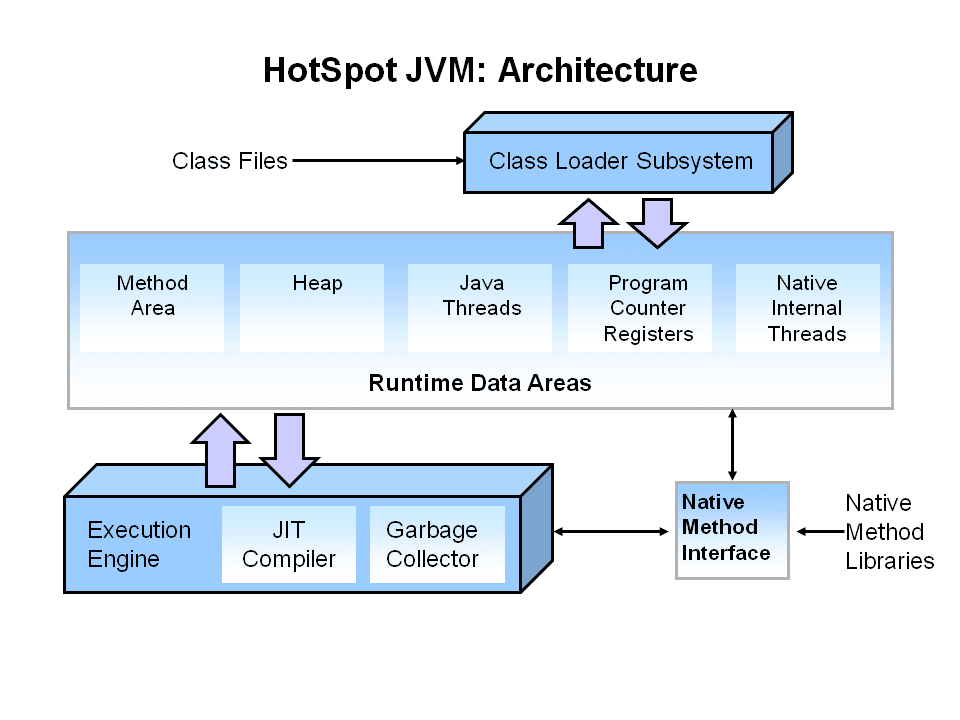
jvm architecture
Image Source: https://www.oracle.com/webfolder/technetwork/tutorials/obe/java/gc01/index.html

JVM’s architecture consists of three core subsystems:

Class Loader

  • Responsibility: Loads .class files into memory.
  • Stages:
    • Loading: Finds and imports binary data.
    • Linking: Verifies code, allocates memory for static variables, and resolves symbolic references.
    • Initialization: Executes static initializers (e.g., static {} blocks).

Runtime Data Areas

JVM allocates memory into five regions:

  1. Method Area: Stores class metadata (e.g., code, constants).
  2. Heap: Dynamic memory for objects (shared across threads).
  3. Stack: Stores method calls, local variables, and partial results (per-thread).
  4. PC Registers: Tracks the address of the currently executing instruction (per-thread).
  5. Native Method Stack: Manages non-Java code (e.g., C/C++ libraries).

Execution Engine

  • Interpreter: Reads and executes bytecode line-by-line.
  • JIT Compiler: Optimizes performance by compiling bytecode to native code for repetitive methods.
  • Garbage Collector (GC): Automatically reclaims memory by deleting unused objects.

How JVM Works: Step-by-Step

Write Java Code:

public class Demo {  
    public static void main(String[] args) {  
        System.out.println("Hello World!");  
    }  
}  

Compile to Bytecode:

javac Demo.java  # Generates Demo.class  

JVM Executes Bytecode:

  • Class Loader loads Demo.class.
  • JVM’s Execution Engine interprets the bytecode.
  • Output: Hello World!

Why is JVM Important?

  • Portability: Run Java apps on Windows, Linux, macOS, or even IoT devices.
  • Security: Sandboxing restricts untrusted code from accessing system resources.
  • Performance: JIT compilation and GC optimize speed and memory usage.
  • Multi-Threading: Native support for concurrent processes.

Common JVM Errors and Fixes

OutOfMemoryError:

  • Cause: Heap space exhausted.
  • Fix: Increase heap size with -Xmx flag:
java -Xmx1024m MyApp  

ClassNotFoundException:

  • Cause: Missing .class file.
  • Fix: Check classpath or rebuild the project.

StackOverflowError

  • Cause: Infinite recursion.
  • Fix: Review recursive method exit conditions.

Conclusion

The JVM is the unsung hero behind Java’s “Write Once, Run Anywhere” magic. By abstracting hardware-specific details, managing memory, and optimizing performance, it empowers developers to build robust, cross-platform applications. Whether you’re debugging a memory leak or exploring Kotlin, mastering JVM fundamentals will deepen your understanding of modern software ecosystems.

Ready to experiment? Install the latest JDK and see JVM in action!

FAQs 

Is JVM only for Java?

No! JVM supports other languages like Kotlin, Scala, and Groovy.

 Can JVM run without a JRE?

No—JVM is part of the JRE (Java Runtime Environment).

How does JVM differ from JRE and JDK?

JVM: Executes bytecode.
JRE: JVM + libraries to run Java apps.
JDK: JRE + tools to develop Java apps.
(Learn more in our JDK vs JRE vs JVM guide.)

Is JVM a compiler?

No. JVM includes an interpreter and JIT compiler but doesn’t compile Java source code—that’s the job of javac (JDK tool).

Related Posts:

  • Difference Between JDK JRE and JVM
  • Control Statements in Java
  • Most Frequently Asked Spring Boot Interview…
  • Building a Simple JDBC Project: Student Management System
  • What is Java? Exploring Its Key Features, Benefits,…
  • Top 10 Common Java Errors
Tags:java
Was this article helpful?
← Previous ArticleJDesktopPane in Java Swing
Next Article →How to Add External jar in Eclipse?

Recent Posts

  • How to implement Passwordless Authentication in Spring Boot: A Step-by-Step Guide
  • How to Use AWS CloudFront Signed URLs in Spring Boot?
  • How to Fix SSH Agent Forwarding on macOS: The Ultimate Guide for Developers
  • How to Read AWS Secrets Manager in Spring Boot (Step-by-Step)
  • How to Fix “Public Key Retrieval is not allowed” MySQL JDBC Error
CoderSathi

Your go-to resource for Java, Spring Boot, Microservices, AWS, and modern development tutorials.

Linkedin

Quick Links

  • About
  • Contact

Popular Topics

  • Java
  • Spring Boot
  • AWS
  • DevOps
  • MongoDB
  • Linux
  • Git
  • How to
© 2026 CoderSathi. All rights reserved. Privacy Policy · Sitemap