
CoderSathi
  • Tutorial
    • Java Tutorial
    • Swing Tutorial
    • JDBC Tutorial
    • Java String Tutorial
    • Servlet and JSP Tutorial
  • Mongo DB
  • AWS
  • DevOps
  • Linux
  • Git
Home > Java > Access Modifiers in Java

Java Tutorial

  • Introduction
    • What is Java
    • History Of Java
    • Install Java
    • What is JVM
    • JDK vs JRE vs JVM
    • Java Bytecode
    • OOP vs POP
    • Compile and Run Java
  • Tokens, Expressions and Control Structures
    • Primitive data types
    • Integers
    • Floating Points
    • Characters
    • Booleans
    • User Defined Data Type
    • Declarations
    • Constants
    • Identifiers
    • Literals
    • Type Conversion and Casting
    • Variables
    • Default Variable Initialization
    • Command Line Arguments
    • Arrays of Primitive Types
    • Comment Syntax
    • Garbage Collection
    • Expressions
    • Operators
    • Arithmetic Operator
    • Bitwise and Shift Operator
    • Comparison or Relational Operators
    • Logical Operators
    • Assignment Operators
    • Ternary Operator
    • Increment and Decrement Operator
    • Control Statements
  • OOP Concepts
    • Class and Object
    • Create Class Instance
    • Method
    • Abstraction
    • Encapsulation
    • this keyword
    • Constructor
    • Pass by Value
    • Access Modifier/Control
    • Polymorphism
    • Method Overloading vs Method Overriding
    • Recursion
    • Nested and Inner Class
  • Inheritance and Packaging
    • Inheritance
    • extends Keyword
    • super Keyword
    • Object Class
    • Abstract class
    • Final Class
    • Java Package
    • Interface
  • Handling Error/ Exceptions
    • What is Exception
    • Exception Handling Keywords
    • Common Java Errors
    • User Defined Exception
    • Throwing and re-throwing Exception
    • finally Block
  • Strings
    • Java String Tutorial
  • Threads
    • Introduction
    • Create Thread
    • Thread Lifecycle
    • Thread Priority
    • Thread Synchronization
    • Inner Thread Communication
    • Thread Deadlock
  • IO and Streams
    • java.io Package
    • Files and Directories
    • Byte Stream
    • Character Stream
    • Console Input and Output
    • Serializable and Deserializable
  • Core Packages
    • java.lang Package
    • Math
    • Wrapper Classes
    • java.lang.Number
    • Double
    • Float
    • Integers
    • java.lang.Byte
    • java.lang.Short
    • java.lang.Long
    • java.lang.Character
    • java.lang.Boolean
    • java.util package
    • Vector Class
    • Stack Class
    • Dictionary Class
    • Hashtable
    • Enumeration or Enum
    • Generate Random Number
  • Holding Collection of Data
    • Arrays
    • Map
    • List
    • Set
    • Collection Interface
    • Collections Class
    • ArrayList
    • HashSet
    • TreeSet
    • Comparator
  • Java Bean
    • What is Java Bean
    • Advantages and Disadvantages of Java Bean
    • Java Beans API
    • Introspection
    • Java Bean Properties
    • Bound and Constrained Properties
    • BeanInfo Interface
    • Customizers
    • Java Beans Persistence
    • BeanDescriptor
  • Home

Access Modifiers in Java

Learn the concepts, implementation details, and practical steps with a clean developer-focused walkthrough.

Yuba Raj Kalathoki
By Yuba Raj Kalathoki
Last updated: July 1, 2026 · 4 min read · 0 Comments
Share: in X
Access Modifiers in Java

Access modifiers in Java dictate how classes, methods, and variables are accessed, ensuring proper encapsulation and code security. By understanding public, private, protected, and default (package-private) modifiers, you’ll write cleaner, more maintainable code. This guide breaks down each modifier with examples, a comparison table, and best practices.

Table of Contents

  • What Are Access Modifiers in Java?
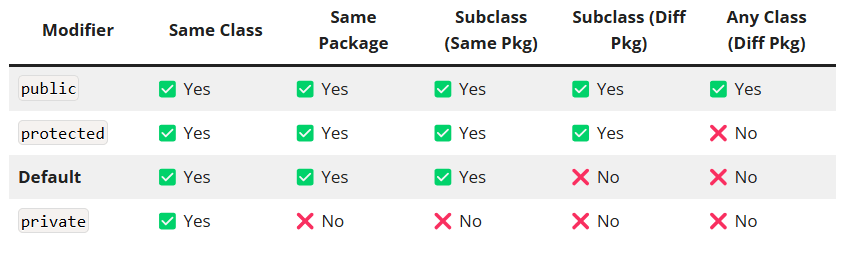
  • Access Modifiers Comparison Table
  • 1. public Modifier
    • Visibility: Everywhere.
  • 2. private Modifier
    • Visibility: Same class only.
  • 3. protected Modifier
    • Visibility: Same package + subclasses (even in different packages).
  • 4. Default (Package-Private) Modifier
    • Visibility: Same package only.
  • Common Mistakes and Fixes
    • 1. Overusing public:
    • 2. Misunderstanding protected:
    • 3. Ignoring Default Scope:
  • Best Practices
  • Conclusion
  • FAQs
    • Can a top-level class be private or protected?
    • How do access modifiers affect method overriding?
    • Can local variables have access modifiers?

What Are Access Modifiers in Java?

Access modifiers define the scope of classes, methods, and variables. They enforce encapsulation by restricting unwanted access and exposing only necessary components. Java has four access levels:

  1. public: Accessible everywhere.
  2. private: Accessible only within the same class.
  3. protected: Accessible within the same package and subclasses (even in different packages).
  4. Default (no modifier): Accessible only within the same package.

Access Modifiers Comparison Table

ModifierSame ClassSame PackageSubclass (Same Pkg)Subclass (Diff Pkg)Any Class (Diff Pkg)
public✅ Yes✅ Yes✅ Yes✅ Yes✅ Yes
protected✅ Yes✅ Yes✅ Yes✅ Yes❌ No
Default✅ Yes✅ Yes✅ Yes❌ No❌ No
private✅ Yes❌ No❌ No❌ No❌ No

1. public Modifier

Visibility: Everywhere.

Use public for classes/methods that form your API.

Example:

public class Animal {  
    public String name;  

    public void eat() {  
        System.out.println("Eating...");  
    }  
}  

// In another package:  
public class Test {  
    public static void main(String[] args) {  
        Animal cat = new Animal();  
        cat.name = "Whiskers"; // Accessible  
        cat.eat(); // Accessible  
    }  
}  

2. private Modifier

Visibility: Same class only.

Use private to enforce encapsulation and hide implementation details.

Example:

public class BankAccount {  
    private double balance; // Hidden from external access  

    public void deposit(double amount) {  
        if (amount > 0) balance += amount; // Controlled modification  
    }  

    public double getBalance() {  
        return balance; // Read-only access  
    }  
}  

3. protected Modifier

Visibility: Same package + subclasses (even in different packages).

Use protected to allow subclass customization.

Example:

package com.codersathi.vehicles;  

public class Vehicle {  
    protected String engineType;  

    protected void startEngine() {  
        System.out.println("Engine started");  
    }  
}  

// Subclass in a different package:  
package com.codersathi.cars;  
import com.codersathi.vehicles.Vehicle;  

public class Car extends Vehicle {  
    public void drive() {  
        engineType = "V8"; // Accessible via inheritance  
        startEngine();      // Accessible via inheritance  
    }  
}  

4. Default (Package-Private) Modifier

Visibility: Same package only.

Use default for package-specific utilities.

Example:

package com.codersathi.utils;  

class Logger { // Default access  
    void log(String message) {  
        System.out.println(message);  
    }  
}  

public class App {  
    public static void main(String[] args) {  
        Logger logger = new Logger(); // Accessible (same package)  
        logger.log("Hello World");  
    }  
}  

// Class in another package cannot access Logger.  

Common Mistakes and Fixes

1. Overusing public:

  • Risk: Exposes internal logic to unintended modifications.
  • Fix: Use private for variables and provide controlled access via methods.

2. Misunderstanding protected:

  • Myth: Protected members are accessible to any class in a different package.
  • Reality: Only accessible to subclasses in different packages.

3. Ignoring Default Scope:

  • Risk: Accidentally exposing package-specific classes/methods.
  • Fix: Explicitly use public or private unless package access is intentional.

Best Practices

  1. Encapsulate Data: Declare variables private and use public getters/setters.
  2. Limit public Exposure: Only expose methods critical to your API.
  3. Use protected Judiciously: For methods/variables meant for subclass extension.
  4. Leverage Default for Utilities: Hide package-specific helper classes.

Conclusion

Access modifiers in Java are essential for building secure, modular applications. By mastering public, private, protected, and default, you’ll enforce encapsulation, reduce bugs, and design robust APIs.

FAQs

Can a top-level class be private or protected?

No. Top-level classes can only be public or default (package-private).

How do access modifiers affect method overriding?

Overriding methods cannot have a more restrictive access modifier.
Superclass: protected → Subclass: public/protected (allowed).
Superclass: public → Subclass: private (error).

Can local variables have access modifiers?

No. Access modifiers apply only to class members (fields, methods, nested classes).

Related Posts:

  • Encapsulation in Java
  • Packages in Java: A Guide to Modular, Maintainable Code
  • Method Overloading vs Method Overriding:…
  • Control Statements in Java
  • MySQL Commands for Developers
  • Abstract Class in Java: Bridging Code Reusability…
Tags:javalanguage-fundamentals
Was this article helpful?
← Previous ArticlePass by Value vs. Pass by Reference in Java
Next Article →Polymorphism in Java

Leave a Comment Cancel reply

You must be logged in to post a comment.

Recent Posts

  • How to implement Passwordless Authentication in Spring Boot: A Step-by-Step Guide
  • How to Use AWS CloudFront Signed URLs in Spring Boot?
  • How to Fix SSH Agent Forwarding on macOS: The Ultimate Guide for Developers
  • How to Read AWS Secrets Manager in Spring Boot (Step-by-Step)
  • How to Fix “Public Key Retrieval is not allowed” MySQL JDBC Error
CoderSathi

Your go-to resource for Java, Spring Boot, Microservices, AWS, and modern development tutorials.

Linkedin

Quick Links

  • About
  • Contact

Popular Topics

  • Java
  • Spring Boot
  • AWS
  • DevOps
  • MongoDB
  • Linux
  • Git
  • How to
© 2026 CoderSathi. All rights reserved. Privacy Policy · Sitemap