
CoderSathi
  • Tutorial
    • Java Tutorial
    • Swing Tutorial
    • JDBC Tutorial
    • Java String Tutorial
    • Servlet and JSP Tutorial
  • Mongo DB
  • AWS
  • DevOps
  • Linux
  • Git
Home > Swing > TitledBorder in Java Swing

Swing Tutorial

  • What Is Java Swing
  • First Program
  • What is AWT
  • Advantages of Swing Over AWT
  • JFrame
  • Swing Components
  • JLabel
  • JTextField
  • JPasswordField
  • JButton
  • Event Handling
  • FlowLayout
  • BorderLayout
  • GridLayout
  • GridBagLayout
  • BoxLayout
  • JPanel
  • JCheckBox
  • JRadioButton
  • Border Component
  • JComboBox
  • JList
  • JList with MVC
  • Mouse Event
  • Key Event
  • JMenuBar
  • JTextArea
  • Using Color
  • Use Font
  • Display Image/Icon
  • Dialog Box
  • JTable
  • JDesktopPane and JInternalFrame
  • JDesktopPane
  • JInternalFrame
  • Adapter Classes
  • Swing Timer
  • JScrollPane
  • JSlider
  • JProgressBar
  • JSeparator
  • JToolBar
  • ActionListener
  • ItemListener
  • Worker Thread
  • Nimbus Look and Feel

TitledBorder in Java Swing

Learn the concepts, implementation details, and practical steps with a clean developer-focused walkthrough.

Yuba Raj Kalathoki
By Yuba Raj Kalathoki
Last updated: July 1, 2026 · 2 min read · 0 Comments
Share: in X

In Java Swing, TitledBorder is a class that allows us to add a border with a title to a component. The title can be positioned at the top, bottom, left or right of the border. This is often used to group related components together and make the user interface more organized and easy to understand.

Following is an example of how to use TitledBorder:

import java.awt.BorderLayout;

import javax.swing.BorderFactory;
import javax.swing.JButton;
import javax.swing.JFrame;
import javax.swing.JPanel;
import javax.swing.border.TitledBorder;

public class TitledBorderDemo extends JPanel {

    public TitledBorderDemo() {
        setLayout(new BorderLayout());
        
        // Create a button with a titled border
        JButton button = new JButton("Click me");
        TitledBorder title = BorderFactory.createTitledBorder("My Button");
        button.setBorder(title);
        
        add(button, BorderLayout.CENTER);
    }
    
    public static void main(String[] args) {
        JFrame frame = new JFrame("TitledBorder Demo");
        frame.setDefaultCloseOperation(JFrame.EXIT_ON_CLOSE);
        frame.setSize(300, 200);
        frame.setLayout(new BorderLayout());
        
        TitledBorderDemo panel = new TitledBorderDemo();
        frame.add(panel, BorderLayout.NORTH);
        
        frame.setVisible(true);
    }

}

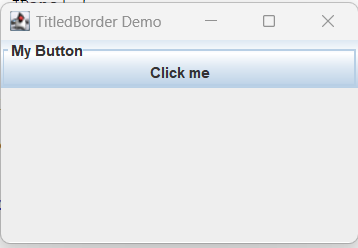
Output:
TitledBorder in java swing

In this example, a new TitledBorder is created using the static method BorderFactory.createTitledBorder(), passing in the desired title as a string parameter. The created border is then set as the button’s border using the setBorder() method. The button is then added to a JPanel with a BorderLayout, and the JPanel is added to a JFrame. When the JFrame is displayed, the button will have a titled border.

Reference: https://docs.oracle.com/javase/tutorial/uiswing/components/border.html

Related Posts:

  • What Is Java Swing? A Complete Guide to Java’s GUI Toolkit
  • Java Swing Tutorial
  • EtchedBorder in Java Swing
  • Interface in Java: Mastering Abstraction and…
  • CompoundBorder in Java Swing
  • How to Install Ollama on Windows, Linux, and macOS:…
Tags:javaswing
Was this article helpful?
← Previous ArticleServer Side Programming in Java
Next Article →MatteBorder in Java Swing

Recent Posts

  • How to implement Passwordless Authentication in Spring Boot: A Step-by-Step Guide
  • How to Use AWS CloudFront Signed URLs in Spring Boot?
  • How to Fix SSH Agent Forwarding on macOS: The Ultimate Guide for Developers
  • How to Read AWS Secrets Manager in Spring Boot (Step-by-Step)
  • How to Fix “Public Key Retrieval is not allowed” MySQL JDBC Error
CoderSathi

Your go-to resource for Java, Spring Boot, Microservices, AWS, and modern development tutorials.

Linkedin

Quick Links

  • About
  • Contact

Popular Topics

  • Java
  • Spring Boot
  • AWS
  • DevOps
  • MongoDB
  • Linux
  • Git
  • How to
© 2026 CoderSathi. All rights reserved. Privacy Policy · Sitemap