
CoderSathi
  • Tutorial
    • Java Tutorial
    • Swing Tutorial
    • JDBC Tutorial
    • Java String Tutorial
    • Servlet and JSP Tutorial
  • Mongo DB
  • AWS
  • DevOps
  • Linux
  • Git
Home > Swing > JLabel in Java Swing

Swing Tutorial

  • What Is Java Swing
  • First Program
  • What is AWT
  • Advantages of Swing Over AWT
  • JFrame
  • Swing Components
  • JLabel
  • JTextField
  • JPasswordField
  • JButton
  • Event Handling
  • FlowLayout
  • BorderLayout
  • GridLayout
  • GridBagLayout
  • BoxLayout
  • JPanel
  • JCheckBox
  • JRadioButton
  • Border Component
  • JComboBox
  • JList
  • JList with MVC
  • Mouse Event
  • Key Event
  • JMenuBar
  • JTextArea
  • Using Color
  • Use Font
  • Display Image/Icon
  • Dialog Box
  • JTable
  • JDesktopPane and JInternalFrame
  • JDesktopPane
  • JInternalFrame
  • Adapter Classes
  • Swing Timer
  • JScrollPane
  • JSlider
  • JProgressBar
  • JSeparator
  • JToolBar
  • ActionListener
  • ItemListener
  • Worker Thread
  • Nimbus Look and Feel

JLabel in Java Swing

Learn the concepts, implementation details, and practical steps with a clean developer-focused walkthrough.

Yuba Raj Kalathoki
By Yuba Raj Kalathoki
Published: January 30, 2022 · 2 min read · 0 Comments
Share: in X

The JLabel class is a Swing component for placing text in a container. It is used to display a single line of read-only text. The text can be changed by an application and can’t be edited by the user directly. It is a child class of JComponent class.

A display area for a short text string or an image, or both. A label does not react to input events. A JLabel object can display either text, an image, or both. You can specify where in the label’s display area the label’s contents are aligned by setting the vertical and horizontal alignment. By default, labels are vertically centered in their display area. Text-only labels are leading edge aligned, by default; image-only labels are horizontally centered, by default.

You can also specify the position of the text relative to the image. By default, the text is on the trailing edge of the image, with the text and image vertically aligned.

Constructors

JLabel()Creates a JLabel instance with no image and with an empty string for the title.
JLabel(Icon image)Creates a JLabel instance with the specified image.
JLabel(Icon image, int horizontalAlignment)Creates a JLabel instance with the specified image and horizontal alignment.
JLabel(String text)Creates a JLabel instance with the specified text.
JLabel(String text, Icon icon, int horizontalAlignment)Creates a JLabel instance with the specified text, image, and horizontal alignment.
JLabel(String text, int horizontalAlignment)Creates a JLabel instance with the specified text and horizontal alignment.

Example

public class JLabelDemo {
	public static void main(String[] args) {
		JFrame frame = new JFrame("JLabel Demo");
		frame.setDefaultCloseOperation(JFrame.EXIT_ON_CLOSE);
		frame.setSize(300, 300);
		frame.setVisible(true);
		frame.setLayout(null);
		// Adding Name label to frame
		JLabel name = new JLabel("Name:");
		name.setBounds(50, 100, 100, 20);
		frame.add(name);
		// Adding Value label to frame
		JLabel value = new JLabel("Coder Sathi");
		value.setBounds(100, 100, 100, 20);
		frame.add(value);
	}
}

Output
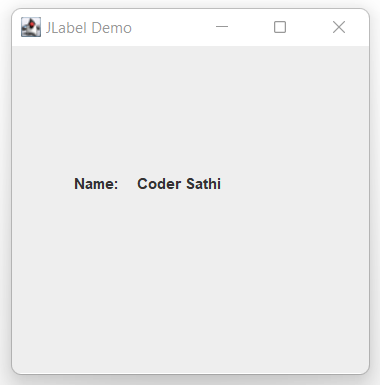
Java Swing JLabel

Conclusion

In this example, we learned how to create a JLabel and add it to JFrame.

Related Posts:

  • java.lang.Short Class in Java
  • Vertical scaling and Horizontal scaling
  • Most Frequently Asked Spring Boot Interview…
  • Command Line Arguments in Java
  • MySQL Commands for Developers
  • Inheritance in Java: A Developer’s Guide to Code Reusability
Tags:javaswing
Was this article helpful?
← Previous ArticleLinkedList in Java
Next Article →Control Statements in Java

Leave a Comment Cancel reply

You must be logged in to post a comment.

Recent Posts

  • How to Use AWS CloudFront Signed URLs in Spring Boot?
  • How to Fix SSH Agent Forwarding on macOS: The Ultimate Guide for Developers
  • How to Read AWS Secrets Manager in Spring Boot (Step-by-Step)
  • How to Fix “Public Key Retrieval is not allowed” MySQL JDBC Error
  • Complete Guide to JaCoCo: How to Measure Java Code Coverage Accurately
CoderSathi

Your go-to resource for Java, Spring Boot, Microservices, AWS, and modern development tutorials.

Linkedin

Quick Links

  • About
  • Contact

Popular Topics

  • Java
  • Spring Boot
  • AWS
  • DevOps
  • MongoDB
  • Linux
  • Git
  • How to
© 2026 CoderSathi. All rights reserved. Privacy Policy · Sitemap