CoderSathi
  • Tutorial
    • Java Tutorial
    • Swing Tutorial
    • JDBC Tutorial
    • Java String Tutorial
    • Servlet and JSP Tutorial
  • Mongo DB
  • AWS
  • DevOps
  • Linux
  • Git
Home > Java > Difference Between JDK JRE and JVM

Java Tutorial

  • Introduction
    • What is Java
    • History Of Java
    • Install Java
    • What is JVM
    • JDK vs JRE vs JVM
    • Java Bytecode
    • OOP vs POP
    • Compile and Run Java
  • Tokens, Expressions and Control Structures
    • Primitive data types
    • Integers
    • Floating Points
    • Characters
    • Booleans
    • User Defined Data Type
    • Declarations
    • Constants
    • Identifiers
    • Literals
    • Type Conversion and Casting
    • Variables
    • Default Variable Initialization
    • Command Line Arguments
    • Arrays of Primitive Types
    • Comment Syntax
    • Garbage Collection
    • Expressions
    • Operators
    • Arithmetic Operator
    • Bitwise and Shift Operator
    • Comparison or Relational Operators
    • Logical Operators
    • Assignment Operators
    • Ternary Operator
    • Increment and Decrement Operator
    • Control Statements
  • OOP Concepts
    • Class and Object
    • Create Class Instance
    • Method
    • Abstraction
    • Encapsulation
    • this keyword
    • Constructor
    • Pass by Value
    • Access Modifier/Control
    • Polymorphism
    • Method Overloading vs Method Overriding
    • Recursion
    • Nested and Inner Class
  • Inheritance and Packaging
    • Inheritance
    • extends Keyword
    • super Keyword
    • Object Class
    • Abstract class
    • Final Class
    • Java Package
    • Interface
  • Handling Error/ Exceptions
    • What is Exception
    • Exception Handling Keywords
    • Common Java Errors
    • User Defined Exception
    • Throwing and re-throwing Exception
    • finally Block
  • Strings
    • Java String Tutorial
  • Threads
    • Introduction
    • Create Thread
    • Thread Lifecycle
    • Thread Priority
    • Thread Synchronization
    • Inner Thread Communication
    • Thread Deadlock
  • IO and Streams
    • java.io Package
    • Files and Directories
    • Byte Stream
    • Character Stream
    • Console Input and Output
    • Serializable and Deserializable
  • Core Packages
    • java.lang Package
    • Math
    • Wrapper Classes
    • java.lang.Number
    • Double
    • Float
    • Integers
    • java.lang.Byte
    • java.lang.Short
    • java.lang.Long
    • java.lang.Character
    • java.lang.Boolean
    • java.util package
    • Vector Class
    • Stack Class
    • Dictionary Class
    • Hashtable
    • Enumeration or Enum
    • Generate Random Number
  • Holding Collection of Data
    • Arrays
    • Map
    • List
    • Set
    • Collection Interface
    • Collections Class
    • ArrayList
    • HashSet
    • TreeSet
    • Comparator
  • Java Bean
    • What is Java Bean
    • Advantages and Disadvantages of Java Bean
    • Java Beans API
    • Introspection
    • Java Bean Properties
    • Bound and Constrained Properties
    • BeanInfo Interface
    • Customizers
    • Java Beans Persistence
    • BeanDescriptor

Difference Between JDK JRE and JVM

Learn the concepts, implementation details, and practical steps with a clean developer-focused walkthrough.

Yuba Raj Kalathoki
By Yuba Raj Kalathoki
Last updated: July 1, 2026 · 3 min read · 0 Comments
Share: in X
Difference between JDK, JRE and JVM

If you’re learning Java or preparing for a technical interview, understanding the difference between JDK JRE and JVM is crucial. These three acronyms form the backbone of Java’s “Write Once, Run Anywhere” philosophy, but they serve distinct purposes. In this guide, we’ll break down each component, explain how they interact, and clarify common misconceptions—complete with diagrams and examples.

Table of Contents

  • 1. What is JVM (Java Virtual Machine)?
    • Key Roles:
  • 2. What is JRE (Java Runtime Environment)?
    • When to Use JRE:
  • 3. What is JDK (Java Development Kit)?
    • When to Use JDK:
  • 4. JDK vs JRE vs JVM: A Side-by-Side Comparison
  • Conclusion
  • Practical Scenarios
  • FAQs
    • Can I run Java apps without JDK?
    • Does installing JDK include JRE and JVM?
    • Why do developers need JDK?
    • Is JVM platform-independent?

1. What is JVM (Java Virtual Machine)?

JVM is the engine that executes Java bytecode. It’s platform-dependent (e.g., Windows JVM differs from macOS JVM) but ensures your Java code runs on any device.

Key Roles:

  • Loads bytecode (.class files).
  • Verifies code for security.
  • Converts bytecode into machine-specific instructions.
  • Manages memory (garbage collection).

Think of JVM as a translator that converts a universal language (bytecode) into a language your OS understands.

2. What is JRE (Java Runtime Environment)?

JRE is the runtime environment required to execute Java applications. It includes:

  • JVM (to run bytecode).
  • Libraries (e.g., java.lang, java.util) for basic functionalities.
  • Other components like Java Web Start.

When to Use JRE:

  • You only need to run Java apps (e.g., games, desktop software).
  • You don’t write or compile code.

 JRE is like a car’s engine + fuel—it lets you drive (run) but doesn’t help you build the car.

3. What is JDK (Java Development Kit)?

JDK is the full toolkit for developing Java applications. It includes:

  • JRE (to run code).
  • Development Tools: Compiler (javac), debugger (jdb), documentation generator (javadoc).
  • Additional libraries for development.

When to Use JDK:

  • You’re writing, compiling, or debugging Java code.
  • Building applications, APIs, or Android apps.

JDK is a car factory—it gives you tools to build, test, and drive the car.

4. JDK vs JRE vs JVM: A Side-by-Side Comparison

ComponentPurposeContainsRequired For
JVMExecute bytecodeClass loader, memory manager, JIT compilerRunning Java apps
JREProvide runtime environmentJVM + core librariesRunning pre-built apps
JDKDevelop Java appsJRE + dev tools (compiler, debugger)Writing/compiling code
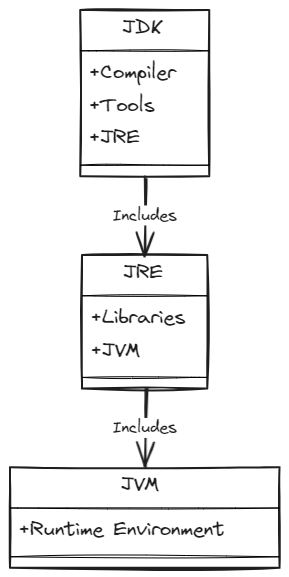
Difference Between JDK, JRE, and JVM

Conclusion

JDK, JRE, and JVM form a layered ecosystem:

  • JDK = Tools + JRE
  • JRE = Libraries + JVM
  • JVM = Execution Engine

Understanding these differences helps you optimize workflows, troubleshoot errors, and ace Java interviews. Ready to code? Install the latest JDK and start building!

Practical Scenarios

  • Building an Android App: Use JDK to write and compile code.
  • Deploying a Web App: Servers need JRE to run your compiled code.
  • Debugging: JDK’s jdb helps troubleshoot runtime errors.

FAQs

Can I run Java apps without JDK?

Yes! You only need JRE to execute pre-compiled apps.

Does installing JDK include JRE and JVM?

Yes. JDK bundles JRE (which includes JVM).

Why do developers need JDK?

To access tools like javac (compiler) and jdb (debugger).

Is JVM platform-independent?

No. JVM itself is platform-specific, but it enables Java’s platform independence.

Related Posts:

  • Control Statements in Java
  • Install and Set Up Java Development Environment
  • What is Java? Exploring Its Key Features, Benefits,…
  • What is JVM (Java Virtual Machine)? Architecture,…
  • What Is Java Swing? A Complete Guide to Java’s GUI Toolkit
  • Most Frequently Asked Spring Boot Interview…
Tags:java
Was this article helpful?
← Previous ArticleHow Java Is Platform Independent?
Next Article →AWS CloudFront

Recent Posts

  • How to implement Passwordless Authentication in Spring Boot: A Step-by-Step Guide
  • How to Use AWS CloudFront Signed URLs in Spring Boot?
  • How to Fix SSH Agent Forwarding on macOS: The Ultimate Guide for Developers
  • How to Read AWS Secrets Manager in Spring Boot (Step-by-Step)
  • How to Fix “Public Key Retrieval is not allowed” MySQL JDBC Error
CoderSathi

Your go-to resource for Java, Spring Boot, Microservices, AWS, and modern development tutorials.

Linkedin

Quick Links

  • About
  • Contact

Popular Topics

  • Java
  • Spring Boot
  • AWS
  • DevOps
  • MongoDB
  • Linux
  • Git
  • How to
© 2026 CoderSathi. All rights reserved. Privacy Policy · Sitemap