

Are you looking to learn more about Servlet programming? Servlets are Java-based web components that run on a web server and provide dynamic content to web browsers. In this post, we will cover a simple Servlet program that can help you understand the basics of Servlet programming.
First, let’s start by discussing what Servlets are and how they work. Servlets are Java classes that are used to extend the capabilities of web servers. They receive requests from clients, process them, and return responses back to the clients. Servlets can be used to create dynamic web pages, handle user input, and interact with databases.
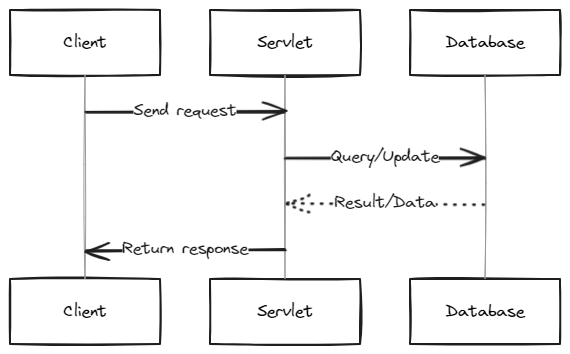
To create a Servlet program, you will need to follow these steps:
- Install a Java Development Kit (JDK) on your computer.
- Set up a web server like Apache Tomcat or Jetty.
- Create a Java class that extends the HttpServlet class.
- Override the doGet() method to handle HTTP GET requests.
- Compile the Java class and deploy the resulting .class file to the web server.
Let’s dive into a simple example of a Servlet program:
import jakarta.servlet.*;
import jakarta.servlet.http.*;
import java.io.*;

public class SimpleServlet extends HttpServlet {
   public void doGet(HttpServletRequest request, HttpServletResponse response) throws ServletException, IOException {
      response.setContentType("text/html");
      PrintWriter out = response.getWriter();
      out.println("<html>");
      out.println("<head>");
      out.println("<title>Simple Servlet Program</title>");
      out.println("</head>");
      out.println("<body>");
      out.println("<h1>Hello, world!</h1>");
      out.println("</body>");
      out.println("</html>");
   }
}
In this example, we import the necessary Servlet and HTTP packages, extend the HttpServlet class, and override the doGet() method to handle HTTP GET requests. Inside the doGet() method, we set the content type of the response to "text/html", create a PrintWriter object to output HTML content to the client, and write the HTML code that generates the "Hello, world!" message.
Once you have created your Servlet program, you will need to compile it and deploy it to your web server. This can be done using the following steps:
- Compile the
SimpleServlet.javafile using the command:javac SimpleServlet.java - Create a directory called
test.comin the webapps directory of your web server. - Create a
WEB-INFdirectory inside the web application directory. (Remember this is case sensitive) - Create a
classesdirectory inside theWEB-INFdirectory. (Theclassesdirectory is also case sensitive) - Copy the
SimpleServlet.classfile to the classes directory. - Create a
web.xmlfile inside theWEB-INFdirectory with the following content:
<web-app>
   <servlet>
      <servlet-name>SimpleServlet</servlet-name>
      <servlet-class>SimpleServlet</servlet-class>
   </servlet>
   <servlet-mapping>
      <servlet-name>SimpleServlet</servlet-name>
      <url-pattern>/SimpleServlet</url-pattern>
   </servlet-mapping>
</web-app>- Restart your web server.
In this example, we create a web.xml file that maps the SimpleServlet class to the /SimpleServlet URL pattern. This means that when a client requests the /SimpleServlet URL, the web server will invoke the SimpleServlet class to handle the request.
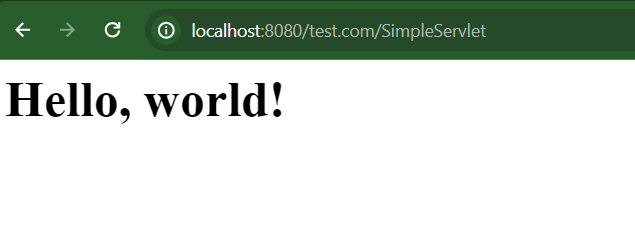
When you type the following URL in your browser it should display the hello world in your browser screen:
http://localhost:8080/test.com/SimpleServletOutput:
FAQs (Frequently Asked Questions)
What is a Servlet in Java?
A Servlet in Java is a server-side component that extends the capabilities of web servers. It receives client requests, processes them, and returns responses to clients. Servlets are primarily used for creating dynamic web pages, handling user input, and interacting with databases.
What does the HttpServlet class do in a Servlet program?
The HttpServlet class is a part of the Java Servlet API and provides methods for handling HTTP requests and responses. Servlets typically extend this class and override its methods, such as doGet() and doPost(), to process HTTP requests and generate responses.
How do I deploy a Servlet to a web server?
To deploy a Servlet to a web server, you’ll need to compile the Servlet’s Java file, create a directory structure in your web server’s webapps directory, and configure a web.xml file to map the Servlet class to a URL pattern. After completing these steps, restart your web server to make the Servlet accessible.
What is the purpose of the web.xml file in Servlet deployment?
The web.xml file, also known as the deployment descriptor, is used to configure Servlets in a web application. It defines mappings between Servlet classes and URL patterns, among other things. This file is essential for the web server to know how to handle client requests for specific Servlets.
How can I test my Servlet program in a web browser?
You can test your Servlet program in a web browser by accessing the URL associated with your Servlet. For example, if you’ve mapped your Servlet class to the “/SimpleServlet” URL pattern, you can access it in your browser using a URL like this: http://localhost:8080/test.com/SimpleServlet